Data analysis begins with summarizing information descriptively. This step should never be skipped. It is how you become familiar with your findings.
Use to Summarize mostly Categorical and Ordinal Data, but can be used to display information on Interval and Ratio scaled data. At the start of an analysis it is essential to have frequency distribution tables
Under the analyze menu choose descriptive statistics then choose frequencies.
When you need to cross the data from two categorical or ordinal variables, percentages from a cross-tabulation table are used. A cross-tabulation table typically contains both the numerical count for each category along with row an/or column percentages. For example, suppose you wanted to know athletic status separately for males and females. You could produce two separate FDTs or you could combine the information and produce one chart.
The crosstabulation of categorical and ordinal data is a good tool for summarizing demographic information and searching for patterns.
From the analyze menu choose descriptive statistics then choose crosstabs. Click on the cells button to customize the output. Under percentages check the appropriate boxes to indicate how you would like percentages displayed - by row, column, or total. When done with selection click continue button. Select and move over to the rows box the variable you want displayed horizontally. Select and move over to the columns box the variable you want displayed vertically. When done with selection click OK button.
Measures of central tendency summarize data by identifying where the center of a distribution of scores is. Measures of variability summarize data by quantifying the spread or dispersion of scores around the center. For categorical and ordinal data the Mode (though a crude measure) is an appropriate measure of central tendency and the range is an appropriate measure of variability. For data at least interval scaled, the Median and Mean are appropriate measures of central tendency, and if the distribution of scores is skewed the Median is the best measure of central tendency. The most common measure of variability is the standard deviation and is appropriate for use with data at least interval scaled.
If working with categorical or ordinal data, from the analyze menu choose descriptive statistics then choose frequencies. Uncheck the box that says display frequency tables. Click on the statistics button. Under central tendency check mode and under dispersion check range, then click continue button. Select the categorical and or ordinal variables you are interested in then click OK button.
If working with interval or ratio data, from the analyze menu choose descriptive statistics then choose descriptives (note: you could also go through frequencies dialog box). Press the options button. Check the mean and standard deviation (also any other measures you would like) then select the display option you prefer:
Ascending Means Alphabetic
Descending Means Variable listClick continue button after selections made. Select the interval or ratio variables you are interested in then click OK button.
To get the mean and standard deviation on subgroups of your sample, from the analyze menu choose compare means then choose means. Select from the list of variables the interval or ratio scaled variables you want means and standard deviations for and move them to the dependent list box. Then select the categorical variable(s) that constitute the subgroups you're interested in and move them to the independent list box. Notice that you can have multiple layers of subgroups. Then click OK button.
To get a wider array of descriptive stats on subgroups of your sample, from the analyze menu select descriptive statistics, then select explore. Select from the list of variables the interval or ratio scaled variables you want means and standard deviations for and move them to the dependent list box. Then select the categorical variable(s) that constitute the subgroups you're interested in and move them to the factor list box. If you're interested in only statistics click that button in the display box. If you would like Plots select plots (then use plots button to specify what you want) from the display box.
To describe the strength of the relationship between two continuous variables use the Pearson Product Moment Correlation
Analyze - correlate - bivariate
To describe the strength of the relationship between two dichotomous variable use Phi
Analyze - descriptive stats - crosstabs - stats - phi/cramers V
To describe the strength of the relationship between two ordinal variable use Kendall
Analyze - correlate - bivariate - check kendall (deselect Pearson)
To describe the strength of the relationship between on true dichotomous and one continuous variable use the point biserial correlation coefficient.
The computational formula for the point biserial coefficient is

Where:
X0 = mean of x values for those in category 0
X1 = mean of the x values for those in category 1
Sx = standard deviation of all x values
P0 = proportion of people in category 0
P1 = proportion of people in category 1
To obtain the components you need from SPSS so you can do Point Biserial by hand, you would:
Whole Group - Continuous Data
Under the analyze menu choose descriptive statistics then choose frequencies. Once inside the frequencies box select the interval/ratio scaled variables you are interested in then single click on the charts button to further specify what type of output (histogram) you want and single click on the continue button. Single click on the OK button when selections complete.
Whole Group - Discrete Data
Under the analyze menu choose descriptive statistics then choose frequencies. Once inside the frequencies box select the categorical/ordinal scaled variables you are interested in then single click on the charts button to further specify what type of output (bar chart) you want and single click on the continue button. Single click on the OK button when selections complete.
Subgroups - Continuous Data
Under the analyze menu choose descriptive statistics then choose explore. Once inside the explore box select the continuous variables you are interested in and move them to the dependent list, then select the grouping variable and move it to the factor list, then single click on the plots bullet in the display box and single click on the plots button to further specify what type of output you want and single click on the continue button. Single click on the OK button when selections complete.
Subgroups - Discrete Data
Under the analyze menu choose descriptive statistics then choose crosstabs. Then move one of the categorical/ordinal scaled variables to the row box and your 2nd categorical/ordinal scaled variable to the rows box. Then check the box (bottom left) ‘display clustered bar charts’.
Remember, the results section of your research papers should open with descriptive statistics regarding your sample. This provides a backdrop against which findings can be placed.
When data is categorical in nature, useful descriptive information includes:
1. Frequency distribution tables
2. Crosstabulation tables; phi, Cramer's V
3. Bar charts
When data is ordinal in nature, useful descriptive information includes:
1. Frequency distribution tables
2. Crosstabulation tables; Cramer’s V
3. Bar charts
When data is at least interval scaled, useful descriptive information includes:
1. Histograms to convey distributional characteristics
2. Central tendency and variability information
a. group mean, median, mode
b. group standard deviation
c. mean & standard deviation by subgroup(s)
3. PPMC; Point Biserial
Regardless of the nature of the variable, it is often useful to condense information before reporting it. Ex: Assume you collected information on years of education in 5 categories (< HS, HS, some college, BS, > MA) but only wanted to report the proportion of people with no college work and those with at least some college work. You would not want to manipulate the original variable so you would first create a new variable then recode the new variable.
To create a duplicate of the variable you want to recode, under the transform menu select compute. Name the new variable under the target variable box.. Select the original variable and move it over to the numeric expression box, then click OK button. Don't forget to give this new variable a variable label and value label if needed.
Now you can manipulate the new duplicate and the original data remains intact. Under the transform menu select recode then select into same variable. Select the new duplicate variable and move it to the numeric variables box. Click the old and new variables button. Carefully identify the old values and what you want them recoded to and following each recode click the add button. When recoding complete press the continue button then click OK button. Don't forget to give these recoded values value labels.
The data from the dependent variable(s) should be examined with respect to validity. If the instrument is a well known one with established validity it may be enough to site a reference where validity was examined and show that the same protocol has been followed in your study on similar subjects. If the measures come from an instrument devised by you, work must be done to show at least logical/content validity and preferably appropriate estimates of criterion related validity.
Content/logical validity (assessed qualitatively)
1. Clearly define what you want to measure.
2. State all procedures you will use to gather measures.
3. Have an "expert" assess whether or not you are measuring what you think you are.
Criterion-related validity (predictive and concurrent)
Compare measures from your 'instrument' with measures from a criterion (expert, another test, etc.)
Concurrent validity (assessed quantitatively)
1. Gather x and y measures from a large group
2. Compute an appropriate correlation coefficient
3. If correlation > .80 your measure (x) is said to have good concurrent validity
Predictive validity (assessed quantitatively)
1. Gather measures using your instrument (x) and measures on the variable(s) you Are trying to predict (y)
2. Compute an appropriate correlation coefficient
3. If correlation > .80 your measure (x) is said to have good predictive validity
Construct Validity (assessed quantitatively)
A construct is an intangible characteristic. When you want to measure a construct such as anxiety, competitiveness, etc., you have no direct means to do so. Therefore indirect methods need to be employed. To then estimate the validity of the indirect measures (as reflections of the construct you're interested in) you record a pattern of correlations between the indirect measure(s) and other similar and dissimilar measures. Your hope is that the pattern reveals high correlations with similar measures (convergent validity) and low correlations with different measures (divergent/discriminant validity).
Two techniques used to quantitatively assess construct validity - Multi-trait multi-method matrix and factor analysis.
The primary concern here is the accuracy of measures of the dependent variable (in a correlational study both the independent and dependent variable should be examined). Reducing sources of measurement error is the key to enhancing the reliability of the data.
Sources of measurement error
As a researcher it is important to identify and eliminate as many sources of error as possible in order to enhance reliability.
Reliability is typically assessed in one of two ways:
1. Internal consistency - Precision and consistency of test scores on one
administration of a test.
2. Stability - Precision and consistency of test scores over time. (test-retest)
To estimate reliability you need 2 or more scores per person.
If motor skills/physiological measures collected at one time only, the most common way of getting 2 scores per person is to split the measures in half - usually by odd/even or first half/second half by time or trials.
For survey research with multiple factors, reliability is typically assessed within factors by examining consistency of response across items within a factor. So, for a survey with 3 factors, you will compute 3 reliability coefficients.
If every subject can be measured twice on the dependent variable then you readily have data from which reliability can be examined.
Once you have 2 scores per person the question is how consistent overall were the scores.
What statistic to use.
An intraclass coefficient is needed. In the past, reliability has been estimated using the Pearson correlation coefficient. This is not appropriate since (1) the PPMC is meant to show the relationship between two different variables - not two measures of the same variable, and (2) the PPMC is not sensitive to fluctuations in test scores.
The PPMC is an interclass coefficient; what is needed is an intraclass coefficient. The two most common are the intraclass R and coefficient alpha.
When interpreting coefficient alpha or the intraclass R, a value > .70 reflects good reliability.
Relationship between reliability and validity: It is possible to have a reliable measures that are invalid. Measures that are valid will by definition also be reliable. However, reliability does not insure validity.
Stability: This way of looking at reliability requires that you collect measures twice. If the measures are reliable they will be stable over the time between the two administrations and scores will be fairly consistent across the group (provided no significant changes take place between administrations).
Ex: Consider a 60 second sit up test administered twice:
| Day 1 | Day 2 | Average |
| 52 | 50 | |
| 41 | 43 | |
| 40 | 38 | |
| 34 | 36 | |
| 38 | 40 | |
| 40 | 42 |
Analyze - Scale - Reliability Analysis - select measures - OK
To estimate the amount of measurement error present in observed scores, the standard error of measurement (SEM) can be calculated following calculation of a reliability coefficient (not available in SPSS).
Standard Error of Measurement (by hand):

You can use the SEM to place a band around the average of the observed scores so that you take into consideration measurement error. Now you have information that tells you not only how reliable (α) the measures are but also how much error (SEM) is present in the observed scores.
What values will you use to obtain the Sx? (Answer: Average column)
Internal Consistency: This way of looking at reliability is necessary when you collect only one set of measures per person. The one measure must then be split in some logical fashion to produce at least two scores per person. If the measures are reliable they will be consistent across the two or more measures per person.
Ex: Consider again the sit up test, but, this time you administer the test only once. To get two scores per person you record the number of sit ups completed in the first 30 seconds and the number completed in the second 30 seconds.
| 1st 30 seconds | 2nd 30 seconds | Total |
| 15 | 18 | 33 |
| 26 | 22 | 48 |
| 20 | 23 | 43 |
| 18 | 18 | 36 |
| 25 | 21 | 46 |
| 20 | 19 | 39 |
Since test length directly influences reliability it is necessary to boost the reliability coefficient since it tells you the reliability of a test half as long (30 seconds) as the one you gave yet you set out to establish the reliability of the 60 second test. So, the statistic to help out is called the Spearman-Brown Prophecy formula. It can be employed any time you manipulate test length or want to hypothesize what would happen to reliability if . . . The formula is:
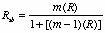
m = the amount you want to boost or diminish test length: new length divided by old/original length.
R = reliability of the old/original length test
In this case, since you split the test in half m will be 2 to boost reliability up to the full length test.
Use SPSS to obtain coefficient alpha, then by hand spearman brown, and then obtain SEM by hand. What values will you use to obtain the Sx? (Answer: Total column)
In research settings it is often necessary to collect measures through observation. To examine objectivity of these measures you look at the consistency of measures across observers. Note: you may also video tape a group and have one person record measures on two occasions.
To assess objectivity, your task, since the measures come from observations, is to examine the objectivity of the data obtained from two or more observers (typically using a rating scale). To do this, have two people observe one group of subjects and evaluate their performance using a rating scale. The measures from the two observers (you could also videotape the group and have one person evaluate the group twice) give you two scores per person to use in the coefficient alpha formula. The Spearman-Brown formula is not needed in this situation since test length is not manipulated.
Note: When interpreting coefficient alpha or the intraclass R, a value > .70 reflects good objectivity.
When the survey is comprised of closed-response items additional care and planning are required since no follow-up is typically available. For a newly developed survety it becomes particularly important to run a pilot study and carefully examine the psychometric characteristics of the data.
Outline for Construction
Data from survey/observational research is particularly susceptible to distortion through the introduction of bias into the research design. While good planning can limit such distortion, it is very difficult to eliminate. Care needs to be taken to gather data in an organized fashion and present it systematically so that valid conclusions can be drawn from the data.
Reminder: . Bias can be defined as any influence, condition, or set of conditions which singly or together cause distortion of the data from what would have been obtained by pure chance. Also, any factor that impairs the randomness of the sample would be considered Bias. Bias due to inadequate sampling impairs external validity.
In survey studies the "manner" in which sample units are selected is very important. Select a sampling process that will result in a representative sample of the population under study.
Questionnaire Construction Details
Note: When you administer survey to study sample, in addition to following suggestions from parts 8 a & b above, offer a copy of the results to your subjects. Provide a postcard for them to return if they would like a copy of your results.
Remember that information obtained via survey has limitations. The data reveals only what the situation is and does not provide insights into factors that cause of influence behaviors or attitudes. In addition, when the topic pertains to opinions/attitudes there is a tendency for respondents to try to give you what you/culture expect.
When developing a survey, its psychometric properties should be examined qualitatively and quantitatively prior to administering the instrument to research subjects. In so doing you enhance the validity of the data and the research you undertake.
Look at content validity by examining factor structure from a factor analysis of survey data.
To establish qualitatively the content validity of a survey, you give your instrument to 'experts' for review. You ask them to place each item under one of the factors that make up your survey. Where their review does not match your intent, revision is necessary.
To establish quantitatively the content validity of a survey you can conduct a factor analysis. This is done by having the computer look for items that are very highly intercorrelated with one another and put them together to form factors. Where the computer's structure does not match your intent, revision is necessary.
Under analyze menu choose data reduction then choose factor. Select variables representing items in the survey you want to know the factor structure for and move them to the variables box. Click on rotation button. Check varimax then click continue button. Click options button. Under coefficient display format check sorted by size then click continue button. Click OK button.
Look at criterion-related validity (when a single score can be derived) by
correlating data from your survey with scores from a criterion measure (so you have to get scores from every subject on the criterion measure as well as your survey).
Calculate an intraclass R or coefficient alpha for each factor produced by the factor analysis.
Inferential statistics serve two principle functions:
1. To predict or estimate a population parameter from a random sample.
2. To test statistically based hypotheses.
The estimation of confidence intervals is a technique for estimating a population parameter from a random sample.
Point estimate: A point estimate is a single statistic which is considered to be the best indicator of the corresponding population parameter. Drawing a sample and calculating its mean is an example of using a point estimate, the mean, to estimate the central tendency of the population the sample came from.
For the estimation of a single parameter from a sample value, point estimates are not as reliable as interval estimates.
Once constructed, confidence intervals enable you to say that across an infinite number of intervals constructed X% of them would contain the true population parameter. A common (though not strictly accurate) interpretation is to say that for a particular interval you are X% confident it contains the population parameter.
To construct an interval estimate for a population mean from a sample mean you need the sample mean and a value called the standard error of the mean.

In words, the above formula says that to construct an interval estimate for a population mean, you take the sample mean plus and minus the standard error of the mean times the Z score associated with the particular size interval you want to construct.
For a 90% confidence interval, z = 1.645
For a 95% confiidence interval, z = 1.96
For a 98% confidence interval, z = 2.33
The standard error of the mean is a population parameter which you don't know, so have to estimate:

so,

For example: Given a sample mean of 70; sample Sx of 12 and 30 subjects, what would the 98% confidence interval be for the population mean?
1. Get z score
z = 2.33
2. use formula:

this gives you 70 + 5.19 or an interval estimate of the population mean of 64.81 to 75.19.
Note: Why N-1 and not just N? Answer is the same as the one for using N-1 in formula for a standard deviation: the sample standard deviation is an estimate of the population standard deviation. Since we know that in general as groups size gets smaller, the spread of scores decreases. So, when you draw a sample, its standard deviation is a biased estimate of the population standard deviation. We can adjust it by dividing by a smaller number to give us a better estimate of the population value.
Same is the case with confidence intervals. You're trying to build a confidence interval that contains the population parameter so a conservative approach is to divide by N-1 rather than N.
To construct an interval estimate for a population median from a sample median you need the sample mean and a value called the standard error of the median (the standard error of the mean times a constant of 1.25).

as before there is no value for the standard error of the mean so a sample value must be used:
For example: sample median = 75, sample Sx = 12, N = 30. Construct a 98% confidence interval:
1. Find Z
Z = 2.33
2. Construct interval

so, interval estimate of population median is 75 + 6.49 or 68.51 to 81.49.
Interval estimates for population proportion
To construct an interval estimate for a population proportion from a sample proportion you need the sample proportion and a value called the standard error of the proportion.

as before there is no value for the standard error of the proportion so a sample value must be used:
For example: Determine the 99% confidence interval for the population proportion of football players driving volkswagen vans given n = 100, p = .36.

so, interval estimate of population proportion is .36 + .124 or .24 to .48.
Confidence intervals can also be used to answer more complex questions such as: Is the mean cholesterol level among those who have participated in nutrition seminars similar to the mean cholesterol level of those who have not?
You would construct confidence intervals around each sample mean and if they overlap there's no significant difference in means. If the confidence intervals do not overlap you can say the means are different.
Example:
| Seminar | No Seminar | |||
| Mean | 183 | 212 | ||
| Standard deviation | 10 | 17 | ||
| N | 50 | 30 |
Using 90% confidence intervals you find:
No Seminar group 90% CI:

so you have 212 + 5.19 or 206.81 to 217.19.
Seminar group 90% CI:

so you have 183 + 2.35 or 180.65 to 185.35.
These confidence intervals do not overlap so it is quite likely that mean cholesterol levels among those who do and do not attend the seminar are different.
To examine whether or not there is a statistically significant difference in means on some dependent variable (continuous) as a function of some independent variable (categorical) you can use the t-test when you have just two levels of the independent variable (ex: gender) or you can use the ANOVA procedure when you have two or more levels of the independent variable (ex: ethnicity).
Statistical Procedures for testing H0: µ1 = µ2
Very common approach to hypothesis testing when you have just 2 levels of an independent variable (ex: two treatment groups).
Example: Are men and women different with respect to dexterity when trying a novel task requiring fine motor control? Assume the dependent variable is quantified by the time it takes to complete the task (in seconds). To examine this question statistically you could use an independent t-test.
Assumptions of the independent t test procedure:
Homogeneity of variance - is the variability of the dependent variable in the
population similar for each level of the independent variable? You examine this assumption by comparing the two standard deviations for the groups in your sample. If they are similar (larger/smaller <2) you have met this assumption.
To get the standard deviation for the dependent variable (as well as mean though it is not of interest in checking homogeneity) on the groups that constitute your independent variable, from the analyze menu choose compare means then choose means. Select from the list of variables the dependent variable you want standard deviations for and move it to the dependent list box. Then select the categorical variable that constitutes the independent variable you're interested in and move it to the independent list box. Then click OK button.
Normality - is the distribution of scores for the dependent variable in the population
normal for each level of the independent variable? You check this assumption by examining histograms for each group. The dependent variable should be normally distributed for each group in your sample.
Under the analyze menu choose descriptive statistics then choose explore. Once inside the explore box select the dependent variable you are interested in and move it to the dependent list, then select the independent variable and move it to the factor list box. Under display check plots, then single click on the plots bullet. Under box plots check none and under descriptives check histogram (uncheck stem & leaf). Single click on the continue button. Single click on the OK button when selections complete.
Sample randomly selected. Scrutinize sampling procedure
If assumptions met you can proceed and conduct an independent t-test. If distributional assumptions not met you should conduct a non-parametric test (Mann-Whitney).
Once you have a t statistic computed (e.g. from statistical software), the next piece of information you need to determine whether or not you can reject the H0: mean1 = mean2 is the degrees of freedom. These values are a function of the number of observations from which the statistic is computed and also the number of values estimated.
For the independent t test df = n1 + n2 - 2.
For a dependent t test df = N-1.
Now, compare your value to the critical value in a t table. If your value is greater than the tabled value you reject the H0. You use a t table by finding the value associated with the degrees of freedom and alpha from your specific problem (study). Typically, you do a 2-tailed test.
Analyze - compare means - independent t
Dependent variable (continuous) top box
Independent variable (categorical) bottom box
Define groups (give values)
To conduct an independent t-test, under the statistics menu choose compare means then choose independent samples t-test. Select the dependent variable and move it to the test variable(s) box. Select the independent variable and move it to the grouping variable box. Click on the define groups button. In the Group 1 box, type the value that identifies subjects in group 1. In the Group 2 box, type the value that identifies subjects in group 2. These are the values associated with the independent variable. Click the continue button. Click OK button.
Magnitude of the effect: Independent t-test. Following a test for a statistically significant difference in means, a measure of practical significance should be examined. Very small differences (of no practical importance) can be found to be statistically significant. Therefore, it is never enough to stop following a statistical test for significance. It is always important to obtain a measure of practical significance. One such measure is eta squared (ω2). Omega squared is an estimate of the proportion of the total variance that can be explained by the influence of the independent variable. Another is to examine effect size which is the standardized difference in the two means.
Effect size by hand:

Interpretation for effect sizes:
.30 small
.50 moderate
.80 large
Omega squared by hand:

Interpretation for omega squared: when > .50, good effect size.
Note: SPSS can give you eta squared under the ANOVA feature. Interpretation for eta squared is the same as for omega squared.
For example, consider a test (t = -2.4) comparing male (n=10) and female (n=8) low-back flexibility. The measure of practical significance would be:

In this case, 21% of the variance in low-back flexibility measures can be attributed to gender. The remaining 79% of the variance is due to individual differences among subjects, other variables not studied, and measurement error. So, even if the t test was statistically significant, the difference is of little practical significance.
When the data is ordinally scaled or when you violate the normality and/or homogeneity assumptions it is advisable to use the Mann-Whitney U statistic to test the null hypothesis that the two medians are equal.
So, i f distributional assumptions for an independent t-test not met you should conduct a non-parametric test (Mann-Whitney). The null hypothesis under examination is now the difference in medians.

Under analyze menu choose non-parametric tests then choose legacy dialogs, then choose 2 independent samples. Select the dependent variable and move it to the test variable list box. Select the independent variable and move it to the grouping variable box. Click define groups button. In the Group 1 box, type the value that identifies subjects in group 1. In the Group 2 box, type the value that identifies subjects in group 2. These are the values associated with the independent variable. Click the continue button. Click OK button.
Note: there are no distributional assumptions for the Mann-Whitney test. Simply the basic assumptions:
Sample randomly selected. Examine whether or not you have met this assumption by scrutinize sampling procedure.
Dependent variable at least ordinally scaled. Examine whether or not you have met this assumption by checking to see that the dependent variable meets the definition of an ordinally scaled variable.
When the two groups of scores are related, a dependent t test should be used. Two groups of scores will be related when (a) two groups of subjects are matched on some characteristic(s) or (b) one group of subjects is tested twice on the same variable.
Example: - Does visualization training affect the performance of gymansts? You could select a random sample of gymnasts, record their scores before and after visualization training. Since this is one group measured twice, a dependent t-test would be appropriate for comparing mean scores.
Assumptions of the dependent t test procedure:
To get the two standard deviations for the two measures of the dependent variable (as well as means though they are not of interest in checking homogeneity), from the analyze menu choose descriptive statistics then choose descriptives. Select from the list of variables the variables that represents the first and second measurement of the dependent variable and move it to the variables box. Then click OK button.
Normality - is the distribution of scores for each measurement of the dependent
variable in the population normal? You check this assumption by examining histograms for measure of the dependent variable. The dependent variable should be normally distributed for each measurement in your sample.
Under the analyze menu choose descriptive statistics then choose explore. Once inside the explore box select each measure of the dependent variable and move it to the dependent list. Under display check plots, then single click on the plots bullet. Under box plots check none and under descriptives check histogram. Single click on the continue button. Single click on the OK button when selections complete.
Sample randomly selected. Examine whether or not you have met this assumption by scrutinize sampling procedure
If assumptions met you can proceed and conduct a dependent t-test. If distributional assumptions not met you should conduct a non-parametric test (Wilcoxon)
To conduct a dependent t-test, under the analyze menu choose compare means then choose paired samples t-test. Select the two variables that represent the two measures of the dependent variable and then move them to the paired variable(s) box. Select the independent variable and move it to the grouping variable box. Click OK button.
Once you have a t statistic computed (e.g. from statistical software), the next piece of information you need to determine whether or not you can reject the H0: mean1 = mean2 using an independent t test is the degrees of freedom. These values are a function of the number of observations from which the statistic is computed and also the number of values estimated.
For a dependent t test df = N-1.
Now, compare your value to the critical value in a t table. If your value is greater than the tabled value you reject the H0. You use a t table by finding the value associated with the degrees of freedom and alpha from your specific problem (study). Typically, you do a 2-tailed test.
Following a test for a statistically significant difference in means a measure of practical significance should be examined. Very small differences (of no practical importance) can be found to be statistically significant. Therefore, it is never enough to stop following a statistical test for significance. It is always important to provide for examination a measure of practical significance. One such measure is eta squared and another is omega squared. Both produce an estimate of the proportion of the total variance that can be explained by the influence of the independent variable. Another measure of practical significance is the effect size.
Practical Significance - magnitude of the effect: Dependent t-test. Stats available are an effect size, eta squared and omega squared.
Effect size by hand:
SPSS can give you eta squared under the Repeated measures ANOVA feature
Example - Does visualization make a difference in performance?
Gymnastics scores before and after visualization training.
| Pre-visualization | Post-visualization | Difference |
| 6.2 | 7.3 | -1.1 |
| 8.8 | 8.8 | 0 |
| 9.2 | 9.0 | .2 |
| 5.5 | 6.0 | -.5 |
| 6.3 | 7 | -.7 |
| 8.1 | 8.5 | -.4 |
| 7.4 | 7.8 | -.4 |
| 9.0 | 8.7 | .3 |
Analyze - compare means - paired samples
Identify repeated measures
Using an alpha of .05 and conducting a 2-tailed test, the critical value is 2.37. You cannot reject the null hypothesis since the t statistic is 1.96.
Effect size:
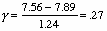
Small effect size.
When the data is ordinally scaled or when you violate the normality and/or homogeneity assumptions it is advisable to use the Wilcoxon statistic to test the null hypothesis that the two medians are equal.
Assumptions of the Wilcoxon procedure:
Symmetry - the differences between pairs of values be a sample from a symmetric distribution. This is a less stringent assumption than requiring normality, since there are many other distributions besides the normal distribution that are symmetric.
Sample randomly selected. Examine whether or not you have met this assumption by scrutinize sampling procedure.
Dependent variable at least ordinally scaled. Examine whether or not you have met this assumption by checking to see that the dependent variable meets the definition of an ordinally scaled variable.
If distributional assumptions for the dependent t-test are not met you should conduct a non-parametric test (Wilcoxon). The null hypothesis under examination is now the difference in medians.
Under analyze menu choose non-parametric tests then choose legacy dialogs, then choose 2 related samples. Highlight the 2 measures of the dependent variable and move them to the test pairs list box. Click OK button.
Most commonly used procedure to test for a significant difference in two or more means.
Testing the H0: µ1 = µ2 = µ3 . . .
An analysis of variance can be used to test the H0 that 2 or more means are equal. For example you might want to examine whether or not isotonic, isokinetic, or a combination of the two are equally good approaches to training for a particular type of athlete.
Analysis of Variance Techniques - Testing the H0: mean1 = mean2 = mean3 . . .
Fixed and Random ANOVA Models:
Typically a researcher wishes to see how subjects perform under particular conditions and chooses the levels accordingly. When generalizing results to populations of subjects who have undergone the chosen levels of an independent variable the fixed effects model is being used.
When the researcher randomly selects the levels and wishes to generalize to the population of levels as well as the population of subjects a random effects model should be employed.
To get the standard deviation for the dependent variable (as well as mean though it is not of interest in checking homogeneity) on the groups that constitute your independent variable, from the analyze menu choose compare means then choose means. Select from the list of variables the dependent variable you want standard deviations for and move it to the dependent list box. Then select the categorical variable that constitutes the independent variable you're interested in and move it to the independent list box. Then click OK button.
Normality - is the distribution of scores for the dependent variable in the population normal for each level of the independent variable? You check this assumption by examining histograms for each group. The dependent variable should be normally distributed for each group in your sample.
Under the analyze menu choose descriptive statistics then choose explore. Once inside the explore box select the dependent variable you are interested in and move it to the dependent list, then select the independent variable and move it to the factor list box. Under display check plots, then single click on the plots bullet. Under box plots check none and under descriptives check histogram. Single click on the continue button. Single click on the OK button when selections complete.
Samples randomly selected. Scrutinize sampling procedure
If assumptions met you can proceed and conduct an ANOVA. If distributional assumptions not met you should conduct a non-parametric test (Kruskal-Wallis is the non-parametric equivalent of the one-way ANOVA).
Some will recommend using an ANOVA procedure for ordinal data but conservative practice limits use of an ANOVA to data that is at least interval scaled.
There is good empirical work demonstrating that violations of normality and homogeneity do not severely affect the outcome of an ANOVA. Violations tend to give an erroneous significance level. For example, although the intended alpha may be .05, the actual probability of error may range from .07 - .09. While there are tests for non-normality and heterogeneity, many are less robust and more susceptible to distortion than the ANOVA itself. It is strongly recommended that large samples be employed whenever feasible and if a conservative approach is called for then non-parametric techniques should be used when assumptions are violated.
To conduct a one-way ANOVA, under the analyze menu choose compare means then choose one-way anova. Select the dependent variable and move it to the dependent list box. Select the independent variable and move it to the factor box. Click on the define range button. In the minimal box, type the value that identifies the smallest value that represents the groups constituting the independent variable. In the maximum box, type the value that identifies that identifies the largest value that represents the groups constituting the independent variable. Click the continue button. Click on post-hoc button if you have three or more levels of the independent variable. Check Scheffe. Click the continue button. Click options button. Under statistics check descriptive and homogeneity of variance. Click display labels. Click the continue button. Click OK button.
Another option: under the analyze menu choose compare means then choose means. Select the dependent variable and move it to the dependent list box. Select the independent variable and move it to the independent list box. Click options button. Select ANOVA table and eta. Click the continue button. Click OK button. The value of this approach is that you get a measure of practical significance.
Another option: under the analyze menu select general linear model then choose univariate. Select the dependent variable and move it to the dependent variable box. Select the independent variable and move it to the fixed factors box. Click options button. Select estimates of effect size and observed power then select homogeneity tests. Click on post-hoc button if you have three or more levels of the independent variable. Check Scheffe. Click the continue button. Click OK button. The value of this approach is that you not only get a measure of practical significance, but you also get an estimate of power.
Once you have an F statistic computed (e.g. from statistical software), the next piece of information you need to determine whether or not you can reject the H0: mean1 = mean2 using an independent t test is the degrees of freedom. These values are a function of the number of observations from which the statistic is computed and also the number of values estimated.
For the 1-way ANOVA df = K-1, N-K
Now, compare your value to the critical value in an F table. If your value is greater than the tabled value you reject the H0. You use an F table by finding the value associated with the numerator and denominator degrees of freedom that comprise the F stantistic and alpha from your specific problem (study). Typically, you do a 2-tailed test.
If you have a statistically significant F statistic you know there's a difference between means. If there are 3 or more means you don't know where the difference is until you do what is referred to as a post-hoc analysis
Post hoc analysis
A significant F statistic indicates only that somewhere means are different; it does not point out which means are different. Special techniques called multiple comparison procedures are needed to determine which means are different. The Scheffe technique is a common (fairly conservative - harder to find significant differences because tabled values higher) technique.
Remember statistical significace following an analysis of variance tells you whether there's a statistically significant difference not whether that difference is of any practical importance. Therefore, it's important to take the next step and obtain a measure of practical significance such as eta2 . This tells you the proportion of total variance due to the 'treatment'. This value can also be interpreted as the practical impact of the independent variable on the dependent variable.
Stats available are an effect size, and eta squared (also known as R2).
Effect size by hand (for all pairs of means):
For eta squared: under the analyze menu select general linear model then choose univariate. Select the dependent variable and move it to the dependent variable box. Select the independent variable and move it to the fixed factors box. Click options button. Select estimates of effect size and observed power. Click the continue button. Click OK button.
When the data is ordinally scaled or when you violate the normality and/or homogeneity assumptions it is advisable to use the Kruskal-Wallis statistic to test the null hypothesis that the two or more medians are equal.
Assumptions for the Kruskal-Wallis procedure:
Sample randomly selected. Examine whether or not you have met this assumption by scrutinize sampling procedure.
Dependent variable at least ordinally scaled. Examine whether or not you have met this assumption by checking to see that the dependent variable meets the definition of an ordinally scaled variable.
If distributional assumptions for the 1-way ANOVA are not met you should conduct a non-parametric test (Kruskal-Wallis is the non-parametric equivalent of the one-way ANOVA).
The null hypothesis under examination is now the difference in medians.
Under analyze menu choose non-parametric tests then choose legacy dialogs, then choose k independent samples. Select the dependent variable and move it to the test variable list box. Select the independent variable and move it to the grouping variable box. Click define range button. In the Group 1 box, type the value that identifies subjects in group 1. In the Group 2 box, type the value that identifies subjects in group 2. These are the values associated with the independent variable. Click the continue button. Click OK button.
Comment: Is the research done when the results are analyzed? No, results/facts are not research, they simply present information for the researcher to use. The interpretation/explanation of why the results are as they appear is where the real research effort lies. Theory building is the real challenge. |
Factorial Design - Two factors (2-way ANOVA)
This extension of the completely randomized design permits investigation of one set of variables in combination with some other set. For example, instead of being interested only in the effects of vitamin supplements (VS), a researcher might be interested in determining the effects of the VS in combination with varying amounts of sleep loss. In the simplest case, two supplements, A & B, would be paired with no sleep loss versus 24 hour loss. This would result in the formation of four groups: (1) Supplement A and no sleep loss, (2) Supplement A and 24 hour loss, (3) Supplement B and no sleep loss, and (4) Supplement B and 24 hour loss.
Assumptions of the two way ANOVA procedure:
To get the standard deviation for the dependent variable (as well as mean though it is not of interest in checking homogeneity) on the groups that constitute your independent variable, from the analyze menu choose compare means then choose means. Select from the list of variables the dependent variable you want standard deviations for and move it to the dependent list box. Then select the categorical variables that constitute the independent variables you're interested in and move them to the independent list box. Then click OK button. NOTE: to get at combinations of levels of the independent variables you will need to carefully select data using select cases feature in SPSS.
Normality - is the distribution of scores for the dependent variable in the population normal for each cell (combinations of levels of the independent variables)? You check this assumption by examining histograms for each cell. The dependent variable should be normally distributed within each cell.
Under the analyze menu choose descriptive statistics then choose explore. Once inside the explore box select the dependent variable you are interested in and move it to the dependent list, then select the independent variables and move it to the factor list box. Under display check plots, then single click on the plots bullet. Under box plots check none and under descriptives check histogram. Single click on the continue button. Single click on the OK button when selections complete. NOTE: to get at combinations of levels of the independent variables you will need to carefully select data using select cases feature in SPSS.
Samples randomly selected (and independent). Scrutinize sampling procedure
Dependent variable at least interval scaled. Data is considered to be continuous.
Points to consider
For each subject there can be only one score. If many measures are taken for each subject, these must be combined (eg averaged) so that there is only one score for each subject.
It is best to have an equal number of subjects in each group.
The number of groups compared depends on the hypothesis being examined, however, it is rare that more than four or five groups are included in either of the two factors.
When you have two independent variables you will have three F tests to examine:
Example
Assume than a researcher is interested in determining the effects of high vs. low-intensity exercise on the memorization of a hard vs. an easy list of nonsense syllables. Subjects would be randomly assigned to four experimental conditions: (1) low intensity & easy list, (2) high intensity& easy list, (3) low intensity& hard list, and (4) high intensity & hard list. The total number of errors made by each subject is the measure recorded. The dependent variable then is the number of errors and the independent variables are exercise intensity (with two levels) and list difficulty (with two levels).
This procedure allows you to examine three hypotheses: (1) the effect of the exercise intensity regardless of list difficulty (called main effect for exercise intensity), (2) the effect of list difficulty regardless of exercise intensity (called main effect for list difficulty), and (3) the interaction between exercise intensity and list difficulty (called the interaction effect).
To conduct a two-way ANOVA, under the analyze menu choose general linear models then choose univariate. Select the dependent variable and move it to the dependent variable box. Select the independent variables and move them to the fixed factor box. Click on post hoc button then select the variable you want post hoc analyses for. Select the type of post hoc analysis you want (e.g. Scheffe), then click the continue button. Click OK button.
The SPSS data file would contain
| ID | Errors | exercise group | List group | |||
| 1 | 9 | 1 | 1 | |||
| 2 | 15 | 2 | 1 | |||
| 3 | 10 | 1 | 2 | |||
| 4 | 19 | 2 | 2 |
etc. . .
The ANOVA table in the output file of SPSS would contain
| Source | df | ss | ms | F | p | |||||
| Main effect for exercise intensity | 1 | 6 | 6 | .66 | ||||||
| Main effect for list | 1 | 140 | 140 | 15.3 | .001 | |||||
| Shock X List interaction | 1 | 20 | 20 | 2.19 | ||||||
| Error | 20 | 183 | 9.15 |
Using an alpha = .01, there is a statistically significant F for the main effect pertaining to list difficulty since the p value is .001.
Stats available are an effect size, and eta squared (also known as R squared).
Effect size by hand (for all pairs of means):
For eta squared: under the analyze menu select general linear model then choose univariate. Select the dependent variable and move it to the dependent variable box. Select the independent variables and move them to the fixed factors box. Click options button. Select estimates of effect size and observed power. Click the continue button. Click OK button.
Note: If distributional assumptions are not met you could use Kruskal-Wallis for each of the test of the main factors.
Testing the H0: µ1 = µ2 = µ3 . . .
The repeated measures design is a variation of the completely randomized design. Instead of using several different groups of subjects with each group receiving a single drug, only one groups of subjects would be used and each subject would receive all the drug treatments. The major advantage of this design over the completely randomized design is that fewer subjects are required. In addition, very often increased statistical power is gained because the random variability of a single subject from one measure to the next is usually much less than the variability introduced by measuring and comparing different subjects. The major disadvantage is that there may be carry-over effects from one treatment to the next. In addition, subjects might become progressively more proficient at performing the criterion task and show an improvement in performance more attributable to learning than the treatment.
Assumptions of the repeated measures ANOVA procedure:
Under statistics choose general linear model then choose repeated measures. Once inside the repeated measures dialog box give a name to the within subjects factor - dependent variable - (by default it will be named factor1). In the number of levels box, type the number of repeated measures of the dependent variable you have. Then press the add button. Next press the define button. Highlight the variable names in the left side box that represent the repeated measures of the dependent variable and move them over to the within-subjects variable box. Then click the OK button. Check Mauchley's test of significance. If significant, the condition of sphericity does not exist and a non parametric test is recommended.
Points to consider
Each subject is tested under, and a score is entered for, each treatment condition.
The number of repeated measures depends on the research question, however, it is rare to have more than four or five treatment conditions.
Example
Assume that a researcher wants to know whether or not mean scores on an intelligence test change from year to year. To answer this, the researcher chooses subjects, all twelve years old, and an IQ score for each subject is recorded at age 12, 13, 14, and 15. The dependent variable in this case is IQ score and the independent variable is age.
To conduct a repeated measures anova, under the analyze menu choose general linear models then choose repeated measures. In the within-subjects box, type a title for the analysis. In the number of levels box type the number of repeated measures. Click define button. Select the measures of the dependent variable and move them to the within-subjects variables box. Click options button and specify information you would like displayed - estimates of effect size, observed power. Click continue button then click OK button.
The F test examines the null hypothesis that mean IQ scores at each testing are equal.
Testing the H0: µ12 = µ13= µ14= µ15
The SPSS data file would contain
| ID | IQ-12 | IQ-13 | IQ-14 | IQ-15 | ||||
| 1 | 98 | 102 | 113 | 108 | ||||
| 2 | 104 | 100 | 105 | 111 | ||||
| 3 | 126 | 131 | 128 | 136 |
etc. . .
The ANOVA table in the output file would contain
| Source | df | ss | ms | F | p | |||||
| Subjects | 19 | 18,700 | ||||||||
| Measures | 3 | 472 | 157.33 | 13.27 | .001 | |||||
| Error | 57 | 676 | 11.86 | |||||||
| Total | 79 | 19848 |
Using an alpha = .01, there is a statistically significant difference in IQ scores across the age groups since the p value = .001.
Stats available are an effect size, omega squared and eta squared (also known as R2).
Effect size by hand (for all pairs of means):
For eta squared: under the analyze menu choose general linear models then choose repeated measures. In the within-subjects box, type a title for the analysis. In the number of levels box type the number of repeated measures. Click define button. Select the measures of the dependent variable and move them to the within-subjects variables box. Click options button. Select estimates of effect size and observed power. Click the continue button. Click OK button.
When the data is ordinally scaled or when you violate the repeated measures ANOVA assumptions it is advisable to use the Friedman statistic to test the null hypothesis that the two or more medians are equal.
Assumptions of the Friedman procedure:
Symmetry - the differences between pairs of values be a sample from a symmetric distribution. This is a less stringent assumption than requiring normality, since there are many other distributions besides the normal distribution that are symmetric.
Sample randomly selected. Examine whether or not you have met this assumption by scrutinize sampling procedure.
Dependent variable at least ordinally scaled. Examine whether or not you have met this assumption by checking to see that the dependent variable meets the definition of an ordinally scaled variable.
Under analyze menu choose non-parametric tests then choose legacy dialogs, then choose k related samples. Select the two or more measures of the dependent variable then move them to the test variables box. Click OK button.
When testing for the presence of a statistically significant relationship, the null hypothesis under examination is:

Recall:
As Sx increases, rxy
As N increases, Sx increases, and rxy
When examining the null hypothesis: that a correlation coefficient = 0, it is also important to remember that the reliability of the research should be considered. In this setting this is a matter of considering the reliability of the correlation coefficient. Said another way the question becomes: If the study is repeated, would the coefficient be similar?
Factors that help insure rxy is reliable:
Large Sx
Reliable and valid measures of x and y
Large N
Assumptions met
Assumptions for Pearson Product Moment Correlation
As always, before proceeding to conduct a parametric test, assumptions must be examined. The assumptions you are interested in checking are:
Under the graphs menu choose scatter. Check to see that the simple box is chosen. Click define button. Select one of the two continuous variables and move it to the y axis box. Select the other continuous variable and move it to the x axis box. Click OK button.
Under the graphs menu choose scatter. Check to see that the simple box is chosen. Click define button. Select one of the two continuous variables and move it to the y axis box. Select the other continuous variable and move it to the x axis box. Click OK button.
If assumptions met you proceed to test for a statistically significant relationship. If they are not met, a non-parametric analysis (chi squared) should be done.
Note: The distributional assumptions are likely to be violated when:
N small
Growth is present. Variance tends to increase with age.
Observations/trials truncated or insufficient practice given. Pattern may be curvilinear.
After you calculate rxy you need to assess:
Statistical significance (test null hypothesis)
Practical significance
To assess statistical significance
Obtain rxy
Under the analyze menu choose correlate, then choose bivariate to examine the strength of the relationship between two continuous variables. Once inside the bivariate correlations box select the two continuous variables you are interested in and move them to the variables box. Click OK button.
It is important to look beyond statistical significance for practical significance. Because, for example, With N=102, and = .05 an rxy of .20 is statistically significant but we know intuitively this is not a strong (or useful) correlation.
Calculate a coefficient of determination (rxy2). This value indicates the proportion of variance in the dependent variable that can be explained by the independent variable.
Example:
If rxy = .60, rxy = .36.
So, 36% of the variance in the DV can be explained by the IV. Left unexplained is 1 - rxy2.
Note: Outliers can significantly affect rxy. All outliers should be critically examined before leaving them in the analysis. If the values are legitimate and your sample size is substantial leave them in the analysis.
The statistic that will test for the presence relationship between two categorical (though can also be used on ordinal data with few categories) variables is the chi-square statistic. The null hypothesis In order examination is:
This is read as: the correlation between x and y is zero. Another way to say this is that the variables x and y are independent. In fact the χ2 statistic is commonly referred to as the chi square test of independence.
When you need to test for a statistically significant relationship between two variables that are categorical or ordinal you will use the chi square statistic. You will also use the chi square statistic when you have violated the distributional assumptions for the pearson product moment correlation.
Assumptions
1. Samples were drawn at random from the population under consideration.
2. Independence. Observations must be independent. The same observation can only appear in one cell.
3. Expected frequencies in each cell at least 5.
Under analyze menu choose descriptive statistics then choose crosstabs. Select one of the two categorical/ordinal variables and move it to the rows box. Select the other variable and move it to the columns box. Click statistics button. Check chi square, check phi & cramer’s V, then click continue button. Click cells button. Under counts check observed and expected. Under percentages choose the method(s) you would like cell percentages based on. Click continue button. Click OK button.
For example, Is there a relationship between level of ability of athletes (N=216) and willingness to spend time on a task for someone else? Assume return rate (of a survey or other information) is considered willingness to spend time for someone else's benefit. The information in the table below then represents return rate by level.
| Spend Time | Elite | College | Intramural |
| Yes | 10 | 32 | 35 |
| No | 62 | 40 | 37 |
To determine if a chi squared value is statistically significant, you compare it to a critical value found in a chi square table. The degrees of freedom for a chi square statistic are:
df = (R-1)(C-1)
Where R = # of rows, and C = # of columns in the two-way table.
The degrees of freedom for this problem are 2 so the critical value for an alpha of .01 is 9.21. Therefore, you can reject the null hypothesis which suggest that there is a statistically relationship between level of ability and willingness to spend time on a task for someone else since the chi squared statistic (22.83) is greater than the critical value (9.21).
This does not necessarily mean that the relationship is of any practical significance. At this point all you know is that the variables in question are not independent. You should not stop here and should not claim you have something special to report.
Since the chi square statistic is sensitive to sample size, just about any two variables can be found to be related statistically given a large enough sample size. So, to examine practical significance you assess the strength of the association between variables using phi or Cramer's V.
Use Phi for 2X2 tables:
Use Cramer's V for larger tables (Cramer's V and Phi are equivalent for smaller tables)
With chi square based measures you cannot say much beyond the strength of the relationship. No predictive interpretation is possible.
This is the most common approach to prediction problems when you have one dependent variable and multiple independent variables.
When used as a prediction tool, the process can be visualized as an attempt to plot the x and y data points and then draw a straight line through those points in such a way that the distance to the line from any point is minimal. Once the line is defined mathematically, an equation can be used to predict the dependent variable from the independent variable.
When used as a data reduction tool, the process can be viewed as a step by step consideration of which variables in combination with each other are most strongly correlated with the dependent variable.
Errors are independent and normally distributed. This can be examined by looking at a histogram of residuals. The distribution should be normal.
Homoscedasticity (variability of y's at each x similar). This can be examined by plotting residuals against predicted values or independent variables. The spread of residuals should not increase or decrease across predicted values.
Linearity (lack of fit of linear model). This can be examined by plotting residuals against predicted values or independent variables. There should be no observable pattern.
Dependent variable at least interval scaled. Should be able to measure dependent variable to finer and finer degrees should you choose to.
Multicolinearity (high correlations between independent variables) should not exists. Check by examining the tolerance statistics. If the tolerance of a variable is small, it is almost a linear combination of the other independent variables. Tolerances that are small suggest you have multicolinearity.
So, to conduct the regression analysis and check assumptions, under the analyze menu, choose regression, then choose linear. Select the dependent variable and move it to the dependent box. Select the independent variables and move them to the independent box. Click statistics button. Check estimates, model fit, and collinearity diagnostics then click continue button. Click plots button. Select ZPRED and move it to the Y box then select SRESID and move it to the X box. Check produce partial plots and check histogram. Click continue button. Click OK button.
From the output generated you are interested in:
1. The tolerance values, histogram and scatterplots (to check assumptions)
2. The p value from the ANOVA table (to check for significant regression)
3. The R2 value (to examine practical significance)
4. The regression equation (for future prediction)
Values from an analysis of variance table (which partitions the variance due to regression (explained) and residual (unexplained)) can be used to (a) test the lack of fit assumption, (b) then if assumptions met, test for a significant regression, and (c) examine practical significance.
To examine independence you can plot residuals against predicted y scores. This should result in a wide horizontal band if errors are independent (since residual scores will not be correlated with predicted y scores when errors are independent).
To examine whether errors are normally distributed you can (a) sum residuals. They should sum to 0 if errors are normally distributed, or (b) get a histogram of residuals. The image should be bell shaped.
To examine the appropriateness of the linear model you can (a) use values from an ANOVA table (if provided) to get an F statistic to test for lack of fit.
Once you have met all assumptions you can test the null hypothesis by comparing the p value from the ANOVA table to your alpha or comparing the F statistic to a critical value in an F table.
Be careful with interpreting significance. It does not necessarily mean that the fitted line is particularly worthwhile.
Allows you to have multiple predictors. A stepwise regression procedure then arranges for you to examine the effects of other variables and look at the relationship of the newest predictor with the dependent variable. You are interested in how much more variance is explained by adding new variables to the prediction equation. The computer stops adding independent variables to the equation when no further significant benefit is gained by adding predictors.
You examine practical significance by computing the coefficient of determination:

This value conveys the percent of the variance in the dependent variable can be explained by the independent variable.
Differences and relationships can be large or small. While it is generally true that larger differences/relationships tend to be statistically significant, significance tests are built on a combination of factors that can offset each other (e.g. size of difference, size of sample, variability). For this reason, sometimes small differences are statistically significant and large differences are not.
Statistical significance does not mean that results are of any practical significance. Both must be examined.
More often than not published research in academic journals is based on samples that are clearly not drawn at random. Strictly speaking, there are no significance tests appropriate for testing for example differences when non random samples are used.
Example pulling several procedures together:
Research designed to examine adherence to physical activity and exercise was used to frame this study of various factors likely to influence adherence to an active lifestyle. While the definition of an active lifestyle could have included engagement in activities such as school, gardening, shopping, and various social events, this work focused on physical components of an active lifestyle likely to produce health benefits. The content of the likert-type items was designed to cover four factors: perceived competency (in some research referred to as efficacy), social support, benefits derived from an active lifestyle, and barriers to the development or maintenance of an active lifestyle. In addition, a section was developed to quantify adherence for each respondent.
A single adherence score was obtained. This value was correlated to an item asking respondents to rate their adherence on a scale of 1 to 10. This correlation was done in an attempt to ascertain how accurate the derived adherence score was. If adequate, it could then be used as the dependent variable in a stepwise regression procedure intended to shed light on which factors are most influential with respect to adherence. Finally, a personal information segment was constructed as well as one open ended item requesting information on what affects the respondent's adherence to an active lifestyle.
Following development of a first draft, a qualitative review of the survey by two physical educators and a recreational therapist was conducted. Their feedback resulted in the revision of several items to enhance their clarity and intent. When revisions were completed pilot tests were then conducted with both able and disabled convenience samples. Following each administration, a principal components analysis with varimax rotation was conducted to examine the factor structure and guide revisions.
Selection of a sample to administer the final version of the survey to proceed on two tracks: (a) Cluster sampling (by class) from a university course catalog was used to select classes to sample able-bodied students from. Once classes were selected the professors were contacted to schedule a time for administration of the survey. (b) Through the university's disabled student services all students in their data base were mailed surveys and asked to participate in the study.
A principal components factor analysis of responses from the primary sample was examined to determine how the survey's content matched what was intended. Following this, coefficient alpha was calculated within each factor to assess the reliability of the responses.
To obtain demographic information overall and within groups (able/disabled), frequency distribution tables for gender and weight category were developed as well as central tendency and variability measures for age. Important patterns were then displayed with crosstabulation tables. Finally, a comparison of the stepwise regression results for able and disabled individuals was done to ascertain which factors best predict adherence for each group.